Screens
Today
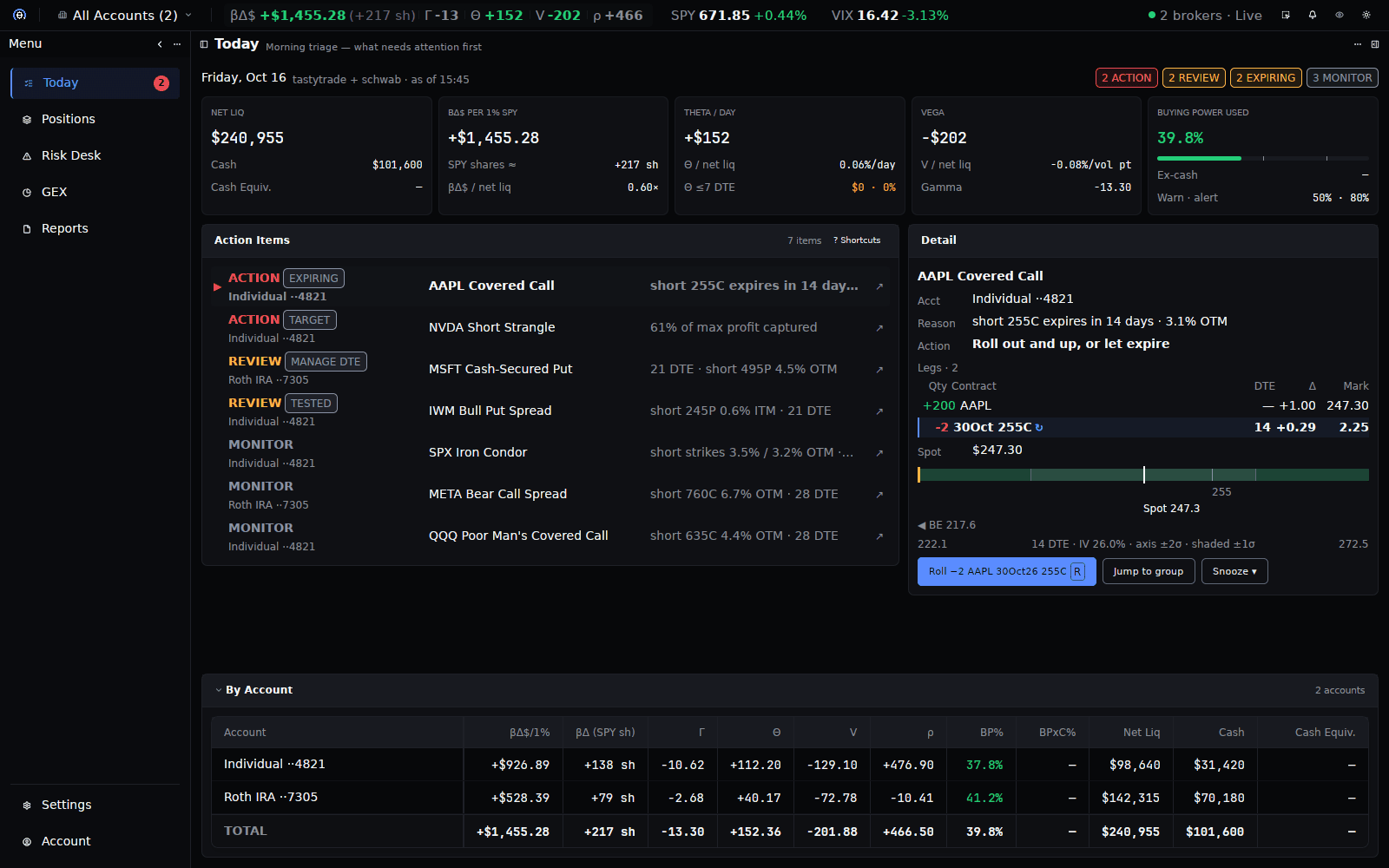
Your morning triage: headline portfolio numbers, then every position that needs a look, sorted into ACTION, REVIEW and MONITOR.
Overview
Today is the screen ThetaWiz opens on. It answers one question: what in your book needs attention first? It shows five headline tiles for the accounts you have selected, then a list of action items. Each item is one position (or one account, for a buying-power alert), with the reason it was flagged and a suggested next step to weigh.
To get back to it, click Today in the left navigation or press Ctrl+1 (Cmd+1 on macOS). The Today item in the navigation shows a badge with the number of ACTION items.
ThetaWiz is read-only. It never places, changes or cancels orders. Suggested actions and roll candidates are things to weigh, not recommendations.
Layout
From top to bottom:
- Summary row. The weekday and date, the data source and the time of the latest snapshot (
as of HH:MM). On the right are count chips:N ACTIONandN REVIEWalways,N EXPIRINGandN MONITORonly when they are not zero. When nothing needs attention and all data is healthy, a single✓ ALL CLEARchip replaces them. - Analysis incomplete banner. Shown only when some data is missing or degraded. See Stale and missing data.
- Headline tiles. Net liq with the day's P/L, βΔ$ per 1% SPY, Theta / day, Vega, and buying power used. See Headline tiles.
- Action Items and Detail, side by side. The item count and a
? Shortcutsbutton sit in the Action Items header. In a narrow window, the detail opens inline under the selected row instead. - Roll Assist. Appears below the list once you click Roll on an item.
- By Account. A collapsible per-account table docked at the bottom.
N EXPIRING counts items with an expiry-driven tag (MANAGE DTE, TIME STOP, ROLL FRONT, ASSIGN AT EXPIRY or EXPIRING). It is a tag count, not a fourth bucket, so those items are also counted in their own bucket.
Headline tiles
The tiles total every account in the current account scope. In a wide window each tile shows its big number and two lines under it. In narrower windows the tiles shrink to one key line, and the other lines move to the tile's tooltip.
| Column | What it shows | How it's calculated | From |
|---|---|---|---|
| Net liq | Total net liquidation value of the accounts in scope. | Sum over accounts of broker cash balance + every leg's liquidation value at its live mark. It moves with live marks instead of waiting for the broker's periodic refresh. See Net liq. | ThetaWiz |
| Day P/L (beside Net liq) | The change in net liq since the previous close, as an amount and a percent, for example +$1,800 (+0.45%). Green for a gain, red for a loss. A leading ≈ means an account has no figure and is left out. since Nov 12 is added when the figure is measured from an older close. Hover for the details. | Per account: live net liq − net liq at the previous close − deposits and withdrawals since then, summed over the accounts in scope. A deposit shows as a gain until the next trade sync. | ThetaWiz |
| Cash Available | Cash free to use after what the broker holds as collateral or margin. A leading ≈ means some account reported no figure; hover to see which. The hover text also gives Cash, the full ledger balance, which includes the held amounts. | Per account: the smaller of Cash and the broker's available figure, summed over the accounts that report one. | Broker |
| Cash Equiv. | Market value of holdings you treat as cash, such as T-bill ETFs. | Sum of the market value of positions in your Cash-equivalent symbols list (Settings). Shows — if any account lacks the figure. | ThetaWiz |
| βΔ$ per 1% SPY | Roughly how many dollars the portfolio gains or loses if SPY moves 1%. | Net beta-weighted dollar delta ÷ 100. Per leg: delta × signed quantity × multiplier × underlying price × beta vs SPY. See Beta-weighting. | ThetaWiz |
| SPY shares ≈ | The same exposure expressed as a number of SPY shares. | Net βΔ$ ÷ SPY price, rounded to whole shares. | ThetaWiz |
| βΔ$ / net liq | Market-move leverage, shown as a multiple (for example 0.27×). Hover for 1% SPY ≈ x% of net liq. | Net βΔ$ ÷ net liq. | ThetaWiz |
| Theta / day | Net time decay in dollars per day. Positive means the book earns decay. | Sum of each leg's theta × signed quantity × multiplier. See Greeks. | ThetaWiz |
| Θ / net liq | Daily theta as a share of net liq. | Theta / day ÷ net liq × 100, in %/day. | ThetaWiz |
| Θ ≤7 DTE | The part of daily theta that comes from legs expiring within 7 days, and its share of total theta. Tinted as a warning when present. | Sum of theta in the ≤7-day expiry bucket; share = that ÷ net theta × 100. | ThetaWiz |
| Vega | Net dollars gained or lost per 1-point rise in implied volatility. Hover for the effect of +10 vol points. | Sum of each leg's vega × signed quantity × multiplier. | ThetaWiz |
| V / net liq | Vega as a share of net liq. | Vega ÷ net liq × 100, in %/vol pt. | ThetaWiz |
| Gamma | Net gamma of the book. | Sum of each leg's gamma × signed quantity × multiplier. | ThetaWiz |
| BP used ex-cash | Share of buying power in use, leaving out the requirement on your cash-equivalent holdings. The tile shows this when the broker gives a per-symbol requirement breakdown. | Per account: (BP used − requirement on cash-equivalent symbols) ÷ broker net liq × 100, then weighted by net liq across accounts. See Buying power. | ThetaWiz |
| Buying power used | The tile's title when the broker gives no per-symbol breakdown. The headline is then gross BP used, and the Ex-cash line shows —. | Per account: BP used ÷ broker net liq × 100, weighted by net liq across accounts. BP used is the broker's maintenance requirement, or net liq − buying power when the broker does not report one. | ThetaWiz |
| BP used | Gross buying power used, including cash-equivalent holdings. Shown under the ex-cash headline. | As above, without removing cash equivalents. | ThetaWiz |
| Warn · alert | The two markers on the buying-power bar: 50% · 80%. The value and bar are tinted as usage crosses them. | — | ThetaWiz |
Ratio lines (βΔ$ / net liq, Θ / net liq, V / net liq) show — when net liq is missing or zero, or when some account's greeks are included but its balance did not load. Most figures ThetaWiz cannot trust show — rather than a zero, with two exceptions: a buying-power percentage that can't be worked out (for example when net liq is zero) shows 0%, and a leg with no usable price adds nothing to net liq.
A leading ≈ on the βΔ$ figures means they are approximate: at least one position used the fallback beta of 1.0 because its real beta wasn't available yet, or was left out because it had no delta or no price. See Beta-weighting.
ACTION, REVIEW and MONITOR
Every action item lands in exactly one bucket, and the list shows them in this order:
| Bucket | Color | What it means |
|---|---|---|
| ACTION | Red | Something is breached or urgent: a stop hit, a short strike tested on undefined risk, assignment risk at expiry, or very high buying-power use. |
| REVIEW | Amber | Worth a look today: a management date reached, a strike tested, a profit target reached, early-assignment risk. |
| MONITOR | Grey | Information only. In practice this is a Wheel short put that is tested or near expiry, where assignment is part of the plan. |
ThetaWiz checks each position against several rules. A position that trips more than one rule still shows as one row. The most severe rule sets the bucket, the reason and the suggested action, and every rule that fired adds its tag. Tags appear as small chips after the bucket name.
Which rules apply depends on how the position is classified: premium-selling credit trades, covered calls, debit (long-premium) directional trades, and time spreads such as calendars and diagonals. Positions in your cash-equivalent list are never checked.
What puts an item on the list
Triggers are described here by what they look at and which way they move. The thresholds you can see and change are in Settings → Risk and are given with their defaults.
| Tag | Fires when | Bucket |
|---|---|---|
| ASSIGN AT EXPIRY | A short option on a stock or ETF is within Expiring-soon DTE (default 7) and its strike is tested or in the money. Cash-settled index options (SPX, SPXW, XSP, VIX, VIXW, NDX, RUT) are skipped because they cannot be assigned early. A priced core short (one with both a mark and an entry price) is judged by EARLY ASSIGN below instead. | ACTION |
| TESTED | A short strike on an undefined-risk position (for example a naked put or strangle) is tested. | ACTION |
| EARLY ASSIGN | A short leg that is part of a strategy's core is in the money with very little time value left compared with the premium it opened for. | ACTION |
| (BP alert) | An account's buying-power use reaches High BP-usage % (default 80). It uses the ex-cash figure when the broker provides one. The row is titled BP — <account>. It starts in REVIEW and moves to ACTION as usage climbs further. | REVIEW or ACTION |
| Tag | Applies to | Fires when | Bucket |
|---|---|---|---|
| MANAGE DTE | Credit trades, covered calls | The nearest short leg reaches the strategy's manage-at DTE. | REVIEW |
| TESTED | Credit trades, covered calls | Spot comes within Short-strike tested band (default 0.02, i.e. 2% of the strike) of a short strike, or passes it. It moves to ACTION when spot is very close to or through the strike. | REVIEW or ACTION |
| STOP LOSS | Credit trades | The loss reaches Credit stop times the opening credit (default 2×; 0 turns it off). | ACTION |
| STOP LOSS | Debit trades | The loss reaches Debit stop percent of the debit paid (default 50%; 0 turns it off). | ACTION |
| TARGET | Credit trades, covered calls, debit trades | Profit captured reaches Profit target — credit % (default 50), Profit target — covered % (default 50, measured on the short call's credit) or Profit target — debit % (blank by default, which never flags). | REVIEW |
| EARLY ASSIGN | Covered calls, Wheel calls | The short call is in the money with very little time value left. | REVIEW |
| TIME STOP | Debit trades | The nearest long option reaches the strategy's manage-at DTE. | REVIEW |
| ROLL FRONT | Time spreads | The front short leg is close to expiry. | REVIEW |
| TENT BREACH | Time spreads | Spot has moved too far from the front short strikes. | REVIEW |
| EXPIRING / TESTED + ASSIGN LIKELY | Wheel in its puts phase | The short put is tested or near expiry. It is shown as information only, because assignment is expected. | MONITOR |
Campaigns add a few more items: a campaign that reaches its own profit or loss exit on its core cost (ACTION, TARGET or STOP LOSS), an income short call that reaches its campaign's profit target (REVIEW, TARGET), and an income PMCC whose short calls now cost at least the anchor's remaining time value to close (REVIEW). See Campaign items on Today.
A strategy definition can set its own management DTE, tested band, stops and targets. Those replace the Settings defaults in that strategy's own rules. The safety rails above ignore the definition: ASSIGN AT EXPIRY and the undefined-risk TESTED rail use the Settings thresholds, and EARLY ASSIGN uses fixed ones. If none of a definition's stops has legs left in its slots, a whole-position stop applies instead: the first stop if it fits the trade type, otherwise the Settings stop for that type. There may be none (a covered call has no Settings stop), and then no stop applies. Each built-in strategy's type and defaults are in Management rules on Today; writing your own is covered in Custom strategies.
Action Items columns
The list has no header row. Each row reads left to right as below. A ▶ marks the selected row.
| Column | What it shows | How it's calculated | From |
|---|---|---|---|
| Bucket and tags | ACTION, REVIEW or MONITOR in the bucket's color, followed by a chip for each tag (for example TESTED, TARGET, MANAGE DTE). A snoozed item that came back early also shows BACK · <cause>. | The most severe rule that fired sets the bucket; tags are every rule that fired. | ThetaWiz |
| Account (under the bucket) | Shown only when more than one account is in scope. Your nickname for the account, else the broker and last four digits (tastytrade ··1234). | — | Broker |
| Position | The underlying and strategy name, for example AAPL Covered Call. A buying-power alert reads BP — <account>. | From ThetaWiz's grouping of your legs into strategies. | ThetaWiz |
| Reason | Why the item fired, for example Short strike tested: short 480 put 2026-11-20. Long text is cut off; hover for the full reason. | — | ThetaWiz |
| ↗ | Open the position in Positions. Same as Ctrl+J (Cmd+J on macOS). | — | ThetaWiz |
Reasons use fixed wording plus static facts such as strike, expiry and DTE. They never quote live prices or P/L, so an ordinary price tick does not change an item or undo a snooze.
When the list is empty and every data check passed, it says Nothing needs attention with a line such as 12 groups checked across 2 accounts · feeds live · as of 09:41. If some data is missing it says Can't confirm all clear instead.
Detail pane
Select a row to fill the Detail pane. With nothing selected it says Select an action item. It shows:
- Title: the position name.
- Acct: the account holding it.
- Reason: why it fired.
- Action: the suggested next step, in bold, for example
Tested: roll the tested side or close. It is a generic step for that rule, not advice. - Legs table (
Legs · N):Qty(green long, red short),Contract,DTE,Delta(per-share delta; see Data sources),MarkandExtr(the part of the mark that is extrinsic value, per share;—when it is not known). Legs that Roll would roll are highlighted with↻. - Spot: the underlying's last price, shown only when known.
- Payoff bar: spot against the strikes. Green and red zones show profit and loss at expiry, ticks are strikes,
BElabels are breakevens. The axis spans ±2 standard deviations of the expected move from implied volatility, with ±1σ shaded. Without IV the axis just spans the strikes (no IV — strike span). - Buttons:
Roll,Jump to groupandSnooze ▾.
Opening Roll Assist
Click Roll in the Detail pane, or press Ctrl+Shift+R (Cmd+Shift+R on macOS), to open Roll Assist for the selected item. The button names what it rolls, for example Roll 220 Call. When a position has more than one rollable unit, a ▾ next to Roll lets you pick which one; the shortcut opens that menu.
Roll Assist opens in its own section below the list (inline under the row in a narrow window). Its header names the unit and the item it was opened from. Refresh fetches the option chain again. Esc closes it. Only one Roll Assist is open at a time; rolling another item replaces it.
Roll is disabled, with the reason underneath, when there is nothing to roll. A long-only option group shows Roll the short call from its own group. Structures Roll Assist does not support show their own message. It is the same Roll Assist used on Positions and Risk; see Roll Assist for its columns and calculations.
Snooze and undo
Snoozing hides an item from Today until a time you choose. Click Snooze ▾ in the Detail pane, or press Ctrl+Shift+S (Cmd+Shift+S), and pick:
- Until next session: until midnight local time at the start of the next trading day.
Ctrl+S(Cmd+S) snoozes this way directly. - 1 hour.
- 1 week and 2 weeks. Each is greyed out when it would reach the day before the nearest expiry.
- 4 weeks: for stock-only positions, which have no dated leg. Greyed out for anything with an option leg and for buying-power alerts.
- Until 21 DTE: until the day the nearest expiry is 21 days away. The menu shows the date, for example
Until 21 DTE (Fri Oct 30). Greyed out when the position has no dated leg or that day has already started. - Until day before expiry: until midnight at the start of the day before the nearest expiry, also shown with its date. It is greyed out when the position has no dated leg or that day has already started.
A snooze never runs past the start of the nearest expiry day, whichever option you pick. Snoozes are saved on your computer, so they survive a restart.
Undo. After a snooze, a toast reads Snoozed <item> until <when>. Click Undo within 6 seconds, or press Ctrl+Z (Cmd+Z), to restore the item as it was.
Back early only if worse. A snoozed item returns before its time only if it gets worse: a new tag appears, it moves to a higher bucket, or the account's buying-power use crosses 50% or 80%. It comes back with a BACK · <cause> chip and a reason that starts Back early:. Once the cause clears or the item stops firing, the chip goes away.
Snoozed list. Below the items, Snoozed (N) · <scope> · back early only if worse expands to show each snoozed item with its bucket, account, reason and until <when>. Click Restore to bring one back now. When the list is otherwise empty, an N snoozed › link opens it.
Account scope
The account switcher in the top bar decides which accounts Today covers. It reads All Accounts (N) by default. Open it to tick one or more accounts, grouped by broker; each row shows its net liq and position count.
Changing the scope rebuilds the tiles, the item list, the Snoozed list and By Account for the new set. While that happens the Action Items header shows Switching accounts…. With more than one account in scope, each row names its account.
By Account
The By Account table at the bottom has one row per account in scope, plus a TOTAL row when there are two or more. Click its header, or press Ctrl+A (Cmd+A), to collapse or expand it. Click an account name to give it a nickname.
| Column | What it shows | How it's calculated | From |
|---|---|---|---|
| Account | Your nickname, else the broker account number. May carry an AS OF HH:MM or NOT LOADED chip. | — | Broker |
| Day P/L | The account's change in net liq since the previous close, with deposits and withdrawals taken out. (2d) after the amount means it is measured from a close two trading days back; hover to see which close. — means no closing value from the last 5 trading days is stored yet. | Live net liq − net liq at the previous close − cash flows since then. A deposit shows as a gain until the next trade sync. | ThetaWiz |
| βΔ$/1% | Dollars gained or lost for a 1% SPY move. | Account βΔ$ ÷ 100. | ThetaWiz |
| βΔ (SPY sh) | The same exposure in SPY shares. | Account βΔ$ ÷ SPY price. | ThetaWiz |
| βΔ$ / NetLiq | Market-move leverage. | Account βΔ$ ÷ account net liq. | ThetaWiz |
| Γ | Net gamma. | Sum over the account's legs. | ThetaWiz |
| Θ | Net theta, dollars per day. | Sum over the account's legs. | ThetaWiz |
| V | Net vega, dollars per vol point. | Sum over the account's legs. | ThetaWiz |
| ρ | Net rho. | Sum over the account's legs. | ThetaWiz |
| BP% | Buying power used. Tinted at 50% and 80%. | BP used ÷ broker net liq × 100, capped at 100. | ThetaWiz |
| BPxC% | Buying power used without the requirement on cash-equivalent holdings. — when the broker gives no per-symbol breakdown. | (BP used − cash-equivalent requirement) ÷ broker net liq × 100. | ThetaWiz |
| Net Liq | Live net liquidation value. | Cash balance + every leg's liquidation value at its live mark. | ThetaWiz |
| Cash | Cash balance: the full ledger balance, including amounts the broker holds as collateral or margin. | — | Broker |
| Available | Cash free to use after what the broker holds as collateral or margin. Never more than Cash. — when the broker reports no figure for the account. | The smaller of Cash and the broker's available figure. | Broker |
| Cash Equiv. | Market value of holdings in your cash-equivalent list. | Sum of their market values. | ThetaWiz |
The TOTAL row sums βΔ$, the greeks, Net Liq, Cash and Cash Equiv. Its BP% and BPxC% are weighted by each account's broker net liq: Σ(BP% × net liq) ÷ Σ net liq. An account that did not load is left out, and the cell says so, for example $1,000 excl. ··1234. The Day P/L and Available totals work differently: when an account has no figure, the total is the sum of the others with a leading ≈, and the hover text names the accounts left out. The Day P/L total also carries (Nd) for the oldest close used.
Keyboard shortcuts
| Key | Action |
|---|---|
Ctrl+1 | Go to Today |
↓ / ↑ | Select the next or previous action item |
Enter | Expand or collapse the selected item (narrow window) |
Ctrl+S | Snooze the selected item until next session |
Ctrl+Shift+S | Open the Snooze menu |
Ctrl+Z | Undo the last snooze |
Ctrl+Shift+R | Roll the selected item (unit menu when it has several) |
Ctrl+J | Open the selected position in Positions |
Ctrl+A | Collapse or expand By Account |
Esc | Close Roll Assist |
Worked example
βΔ$ (per leg) = delta × signed qty × multiplier × spot × beta
βΔ$ per 1% SPY = Σ βΔ$ ÷ 100
SPY shares ≈ Σ βΔ$ ÷ SPY spot
βΔ$ / net liq = Σ βΔ$ ÷ net liq
Θ / net liq = theta ÷ net liq × 100   (%/day)
V / net liq = vega ÷ net liq × 100    (%/vol pt)
BP used % = BP used ÷ broker net liq × 100
Net liq $120,000. SPY $500 (beta 1.0). AAPL $200 (beta 1.2).
Short 1 SPY put, delta −0.30: βΔ$ = −0.30 × −1 × 100 × 500 × 1.0 = +$15,000
Long 100 AAPL: βΔ$ = 1 × 100 × 1 × 200 × 1.2 = +$24,000
Short 1 AAPL call, delta 0.30: βΔ$ = 0.30 × −1 × 100 × 200 × 1.2 = −$7,200
Net βΔ$ = 15,000 + 24,000 − 7,200 = $31,800
βΔ$ per 1% SPY = 31,800 ÷ 100 = $318
SPY shares ≈ 31,800 ÷ 500 = 63.6 → +64 sh
βΔ$ / net liq = 31,800 ÷ 120,000 = 0.27×  (1% SPY ≈ 0.27% of net liq)
Theta: put −0.12 × −1 × 100 = +$12; call −0.08 × −1 × 100 = +$8 → Theta / day +$20
Θ / net liq = 20 ÷ 120,000 × 100 = 0.02%/day
Vega: put 0.45 × −1 × 100 = −$45; call 0.20 × −1 × 100 = −$20 → Vega −$65
V / net liq = −65 ÷ 120,000 × 100 = −0.05%/vol pt; +10 vol pts ≈ −$650
Broker maintenance requirement $30,000 → BP used = 30,000 ÷ 120,000 = 25.0%
Short-strike tested band = 0.02 (the default).
Distance for a short put = (spot − strike) ÷ strike.
SPY at 489, short 480 put: (489 − 480) ÷ 480 = 0.019 → within 0.02, so TESTED.
SPY at 500: (500 − 480) ÷ 480 = 0.042 → not tested.
For a short call the distance is (strike − spot) ÷ strike. Zero or below means in the money.
Stale and missing data
- **
*after a value.** An account is showing its last good data, because its positions fetch is failing or its live feed is down. Every tile value (and that account's By Account row and the TOTAL) gets a*, and a line above the tiles adds* includes last-good data. - `AS OF HH:MM` chip on a By Account row: the time that account's last good data is from. Hover for the exact time.
AS OF —means the time is unknown. - `NOT LOADED` chip: the account never loaded. Its row shows
—, it is left out of every total, and its action items are not listed. The line above the tiles saysTotals exclude <account> (not loaded). - Balances only missing: greeks still count, but Net liq and BP leave the account out:
Net liq and BP exclude <account> (balances not loaded). - Analysis incomplete banner: lists why the analysis cannot be trusted in full, for example a feed that is down or reconnecting, an account whose data is unavailable, or a connection that needs re-authorization.
since HH:MMshows when last-good data began. Retry (orRetry <broker>) asks for a fresh snapshot. Items that did fire are still listed, but Today will not claim an all-clear. - `≈` on βΔ$: the figure is approximate. At least one position uses the fallback beta of 1.0, or was left out because it had no delta or no price.
Notes and limits
- No broker connected: Today shows Connect a broker to see your morning triage with a connect button and a link to Settings → Connections. While the first snapshot builds it shows the steps
Connected,Building first risk snapshotandReady. See Connect your broker. - Accounts unavailable: if ThetaWiz cannot list your accounts, Today says so and offers Open Settings → Connections.
- Schwab: Schwab does not report a per-symbol requirement breakdown, so BPxC% shows
—, the BP tile shows gross Buying power used, and the BP alert uses gross usage. When the broker gives no maintenance requirement, BP used is net liq − buying power. Schwab futures options are not supported. - Cash-settled index options (SPX, SPXW, XSP, VIX, VIXW, NDX, RUT) are never flagged for assignment at expiry.
- Missing marks or entry prices: a stop loss or profit target cannot fire for a position whose legs lack a mark or an entry price.
- Incomplete data and snoozes: while an account's data is incomplete, its snoozes still expire on time, but they do not come back early or get cleared until the data is healthy again.
- Privacy mode (Settings) masks dollar amounts on the tiles and account names, so you can share your screen.