Screens
Gamma exposure (GEX)
The GEX screen estimates where options hedging could dampen or speed up moves in an underlying. It shows gamma exposure by strike and by expiry, with the put wall, call wall and gamma flip.
Overview
Gamma exposure (GEX) adds up the gamma held in every open option contract on one underlying, weighted by open interest. ThetaWiz shows it by strike and by expiry so you can see where open interest is concentrated around the current price. Use it as background when you place or manage short strikes, for example to see whether a short put sits near a large block of put gamma.
Open it from GEX in the left menu, or press Ctrl+4 (Cmd+4 on macOS). Then pick a symbol from your watchlist or type one into the Symbol box.
GEX rests on an assumption about who holds the options. Open interest tells you how many contracts are open, not who is long or short them. ThetaWiz assumes dealers are long the calls and short the puts (see How GEX is calculated). When real positioning differs, the signs, walls and flip can be wrong. ThetaWiz shows GEX as context, not as a signal, and nothing on this screen is a trade recommendation.
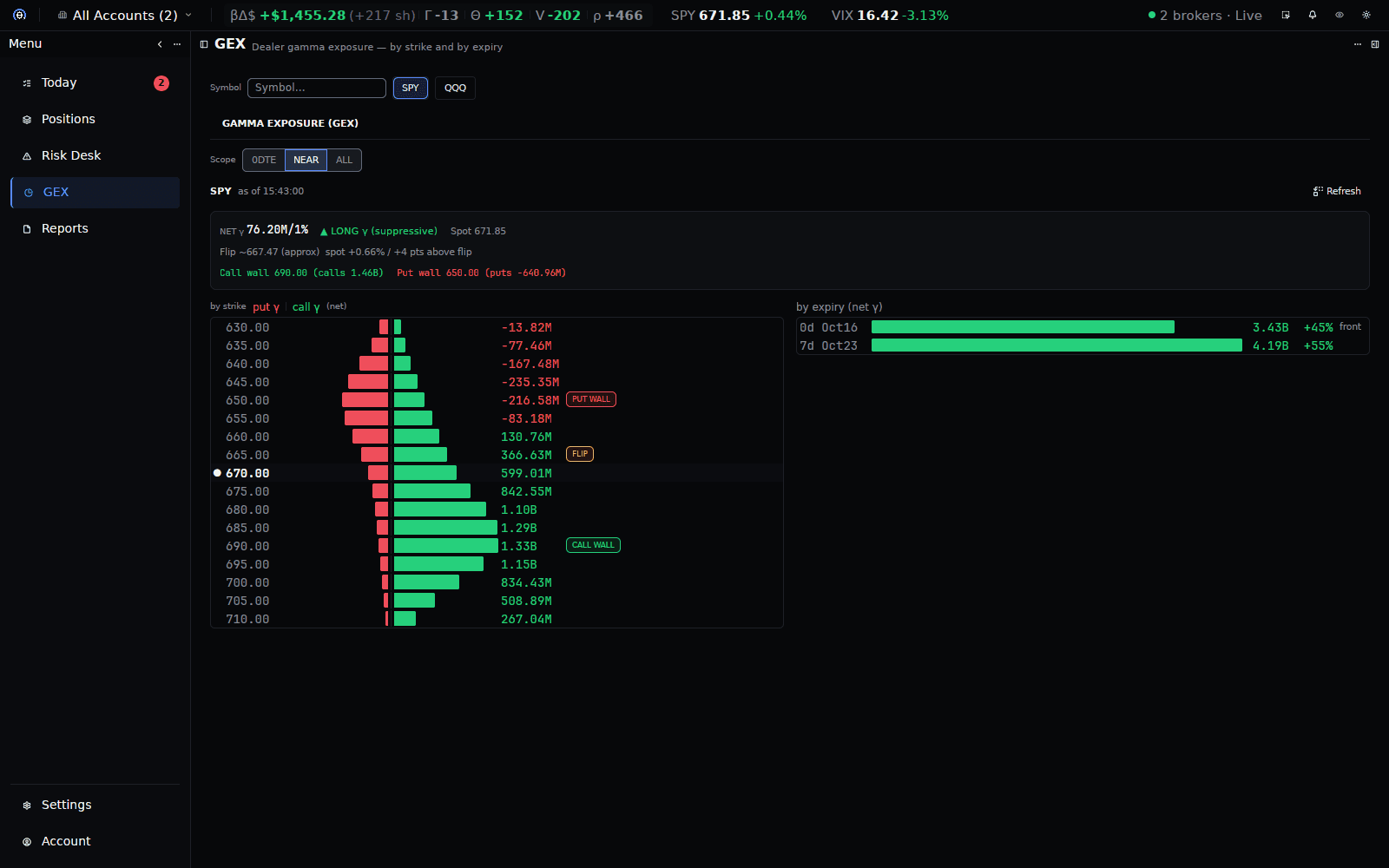
Layout
The screen has five parts, top to bottom.
- Symbol bar. A Symbol box that suggests matches from the selected watchlist as you type, then up to 10 chips for the symbols you viewed most recently. Click a chip to show that symbol. A symbol you type that is not in the watchlist gets an outlined chip with a × to remove it. It lasts for this session only and is not saved to any list.
- Scope. 0DTE, NEAR and ALL choose which expirations count. The scope applies to everything below it: the summary, the by-strike profile and the by-expiry list.
- Symbol line. The symbol, an
as of HH:MM:SStime (your local time) for when its GEX was calculated, orrefreshing…while a fetch is running, and a Refresh button. - Summary box. Net gamma, the regime, spot, the flip line, and the call and put walls.
- Profiles. The by-strike profile on the left and the by-expiry list on the right. On a narrow window the two stack, with by-expiry below.
| Column | What it shows | How it's calculated | From |
|---|---|---|---|
| NET γ | Net gamma exposure across every strike in the scope, per 1% move in the underlying, shown like 76.20M/1%. | Sum of the per-strike net GEX × 0.01 | ThetaWiz |
| ▲ LONG γ (suppressive) / ▼ SHORT γ (explosive) / • NEUTRAL γ | The regime, from the sign of the net. Long gamma: dealer hedging is assumed to lean against moves. Short gamma: hedging is assumed to add to moves. | Net > 0 is long, net < 0 is short, exactly 0 (or no strikes) is neutral | ThetaWiz |
| Spot | The underlying price that came with the option chain, used for every calculation on the screen. | — | Broker |
| Flip | The approximate gamma flip price, and how far spot is above or below it, e.g. Flip ~667.47 (approx) spot +0.66% / +4 pts above flip. Shows Flip: none in range — fully long γ (or short, or flat) when there is no sign change. | See Walls and flip | ThetaWiz |
| Call wall | The strike with the most call gamma, and that call GEX, e.g. Call wall 690.00 (calls 1.46B). | Strike with the largest call GEX in the scope | ThetaWiz |
| Put wall | The strike with the most put gamma, and that put GEX (a negative number), e.g. Put wall 650.00 (puts -640.96M). Shows no walls when neither wall exists. | Strike with the most negative put GEX in the scope | ThetaWiz |
| Column | What it shows | How it's calculated | From |
|---|---|---|---|
| Strike | The strike price. A ● marks the strike closest to spot, and the list scrolls to centre on it when you change symbol or scope. | — | Broker |
| put γ | Red bar to the left of the axis: the size of put GEX at the strike. | |put GEX| ÷ the largest |call GEX| or |put GEX| at any strike in the scope | ThetaWiz |
| call γ | Green bar to the right of the axis: the size of call GEX at the strike. | |call GEX| ÷ the same scale as the put bars | ThetaWiz |
| (net) | Net GEX at the strike in dollars, green when positive and red when negative. Not divided by 100, so it is on a different scale from NET γ. | call GEX + put GEX | ThetaWiz |
| CALL WALL / PUT WALL / FLIP | Badges on the call wall strike, the put wall strike, and the strike closest to the flip price. | — | ThetaWiz |
| Column | What it shows | How it's calculated | From |
|---|---|---|---|
| Label | Days to expiration and the date, e.g. 7d Oct23. | See DTE | Broker |
| Bar | One bar per expiration, green for positive net GEX and red for negative, scaled to the largest expiration in the scope. | |net GEX of expiry| ÷ the largest |net GEX| of any expiry in the scope | ThetaWiz |
| Value | Net GEX for the expiration in dollars (calls plus puts across all strikes). | Sum of call GEX + put GEX for every included contract in that expiry | ThetaWiz |
| Percent | That expiration's signed share of all gamma in the scope, e.g. +45%. | net GEX of expiry ÷ sum of |net GEX| over all expiries in the scope × 100 | ThetaWiz |
| front | Tag on the nearest expiration in the scope. | — | ThetaWiz |
How GEX is calculated
ThetaWiz fetches the option chain for the symbol from your connected broker (tastytrade or Schwab) and calculates GEX on your computer. Each contract in the chain contributes its dollar gamma: how much hedge exposure the open contracts would need to change as the price moves.
dollar gamma = Γ × S² × multiplier × OI
call GEX = + dollar gamma
put GEX  = − dollar gamma
strike net GEX = Σ call GEX + Σ put GEX at that strike
NET γ (per 1% move) = Σ strike net GEX × 0.01
- Γ is the contract's gamma per share, from your broker. If the broker gives no gamma, ThetaWiz calculates it with Black-Scholes from the contract's implied volatility, a fixed 4.5% risk-free rate and no dividend yield (see Option pricing).
- S is the spot price of the underlying that came with the chain.
- multiplier is the contract multiplier, usually 100 for equity options.
- OI is open interest, from your broker.
- Multiplying by 0.01 turns the total into dollars per 1% move in the underlying. The per-strike, per-expiry and wall figures are shown without that factor, so they are 100 times larger than they would be per 1%.
Sign convention. Calls count as positive and puts as negative. This treats dealers as long gamma on call open interest and short gamma on put open interest, which is the usual published convention. A positive net is labelled long gamma (dealer hedging is assumed to lean against moves) and a negative net short gamma (hedging is assumed to add to moves). ThetaWiz has no way to check this assumption against real positions.
Spot S = 670, so S² = 448,900. Multiplier 100.
670 call: Γ = 0.020, OI = 4,000
  0.020 × 448,900 × 100 × 4,000 = +3,591,200,000 → call GEX +3.59B
670 put: Γ = 0.018, OI = 6,000
  0.018 × 448,900 × 100 × 6,000 = 4,848,120,000 → put GEX −4.85B
Strike net = 3,591,200,000 − 4,848,120,000 = −1,256,920,000 → (net) shows -1.26B
Per 1% move: −1,256,920,000 × 0.01 = −12,569,200 → about −12.57M/1%
By strike sums every included contract at the same strike, across all expirations in the scope. By expiry sums every included contract with the same expiration, across all strikes.
What is included. Each fetch loads expirations from 0 days out to the GEX fetch window (days) setting, 30 by default (inclusive). Only strikes within 15% of spot, above or below, are kept. A contract is left out when its open interest is missing or zero, or when it has neither a broker gamma nor an implied volatility. Without a broker gamma, a contract that expires today is also left out, because Black-Scholes needs time left to expiry.
| Scope | Expirations counted |
|---|---|
| 0DTE | Only the nearest expiration that has data. This is today's expiration when one exists, otherwise the next one. |
| NEAR (default) | Expirations within the GEX NEAR window (days) setting, 7 by default. |
| ALL | Everything fetched, up to the GEX fetch window (days) setting. |
Walls and flip
All three are found from the by-strike rows in the current scope, so they can move when you switch between 0DTE, NEAR and ALL.
- Call wall: the strike with the largest positive call GEX. It is chosen on call GEX alone, not the strike's net, so a strike with heavy calls can still be the call wall when even heavier puts make its net negative.
- Put wall: the strike with the most negative put GEX, chosen on put GEX alone in the same way.
- Ties: if two strikes have exactly the same value, the one nearer spot wins, then the lower strike.
- Gamma flip: start at the lowest strike and keep a running total of net GEX, strike by strike upward. The flip is the first point where that running total changes sign, placed between the two strikes by straight-line interpolation. If the running total lands exactly on zero at a strike, the flip is that strike. It is always marked
(approx), because the real flip usually falls between listed strikes. If the running total never changes sign, there is no flip.
C₁ = running total through K₁,  C₂ = running total through K₂ (opposite sign)
flip = K₁ + (K₂ − K₁) × (0 − C₁) ÷ (C₂ − C₁)
distance (pts) = spot − flip
distance (%) = (spot − flip) ÷ flip × 100
660: call +50M, put −350M → net −300M
665: call +150M, put −250M → net −100M
670: call +400M, put −150M → net +250M
675: call +450M, put −50M → net +400M
Running total: −300M, −400M, −150M, +250M → sign changes between 670 and 675
flip = 670 + 5 × (0 − (−150)) ÷ (250 − (−150)) = 670 + 5 × 150 ÷ 400 = 671.875
Distance: 670 − 671.875 = −1.875 pts; −1.875 ÷ 671.875 × 100 = −0.28%
Flip line: Flip ~671.88 (approx)  spot -0.28% / -2 pts below flip
FLIP badge goes on 670, the listed strike nearest 671.875
Call wall 675.00 (calls 450.00M); Put wall 660.00 (puts -350.00M)
NET γ = (−300 − 100 + 250 + 400)M × 0.01 = 2.50M/1% → ▲ LONG γ (suppressive)
The running total starts at the lowest strike kept, which is about 15% below spot. A different strike range would give a different flip, so treat it as a rough level, not an exact price.
Controls
| Control | What it does |
|---|---|
| Symbol box | Type to filter the selected watchlist (up to 8 suggestions). Use Up and Down to highlight one and Enter to show it. Enter on any other single symbol shows it as a session symbol. Esc closes the suggestions. |
| Watchlist | While GEX is open, clicking a symbol in the watchlist shows its GEX. Opening the page shows the watchlist's selected symbol, if there is one. |
| Symbol chips | Click to switch symbols. A symbol already loaded appears straight away from its last fetch. × removes a session symbol's chip. |
| 0DTE / NEAR / ALL | Change the scope. This re-sums the data already loaded and never fetches again. |
| Ctrl+D (Cmd+D on macOS) | Cycle the scope: 0DTE → NEAR → ALL → 0DTE. |
| Refresh | Fetch a new chain and recalculate GEX for the symbol on screen. Other loaded symbols keep their own data. |
| Compute GEX | Shown when GEX has not been calculated or is unavailable. Fetches again for every symbol in the recent chips. |
Two settings under GEX in Settings → Risk control the window: GEX fetch window (days) (default 30) and GEX NEAR window (days) (default 7). Changes apply on the next fetch or Refresh. Symbols already loaded keep their old window until then. See Settings.
Notes and limits
- No automatic refresh. GEX is not fetched at startup or on a timer. It is fetched the first time you show a symbol and again only when you press Refresh. Check the
as oftime before you rely on it. The hub may answer a Refresh from an option chain it fetched in the last 30 seconds. - Up to 10 symbols are kept. Showing an 11th drops the one you viewed longest ago. Showing it again fetches it fresh.
- Fetch time. Large chains take a while. A fetch that takes longer than 45 seconds is abandoned.
- A failed refresh keeps the old view. The profile and its
as oftime stay as they were. If GEX has never loaded since you opened the app, the screen shows GEX unavailable with the reason and a Compute GEX button. - Stuck on Loading. If a symbol's first fetch fails, the screen can stay on
Loading SYMBOL…. Click the symbol's chip again to retry. - No GEX data.
No GEX data — all N contracts filtered or missing.means the chain loaded but no contract could be used, usually because the broker returned no open interest (or zero) for its contracts. - No GEX in scope.
No GEX in 0DTE scope — widen the scope.(or NEAR) means nothing loaded falls in that scope. Switch to NEAR or ALL, or raise the window in Settings. - No broker connected. The screen shows the same connect-your-broker prompt as the other data screens. See Connect your broker.
- Brokers. Chains come from whichever connected broker is serving option chains, tastytrade or Schwab. GEX is the same calculation for both. Schwab futures options are not supported.
- GEX is context, not a signal. It depends on the dealer-positioning assumption above, on open interest that does not show who holds each contract, and on the strike window. Use it next to your own analysis, not in place of it.